The WhatsApp Business API is how a business number stops living on one phone: WhatsApp connects it to software, so your whole team answers from one inbox and every chat lands on the customer’s record.
Here is what it is, when you need it instead of the free app, how messages and costs work, and how to get it in SkedX Flow.
In review: written from the product, not yet walked through live.
1The app and the API, side by side
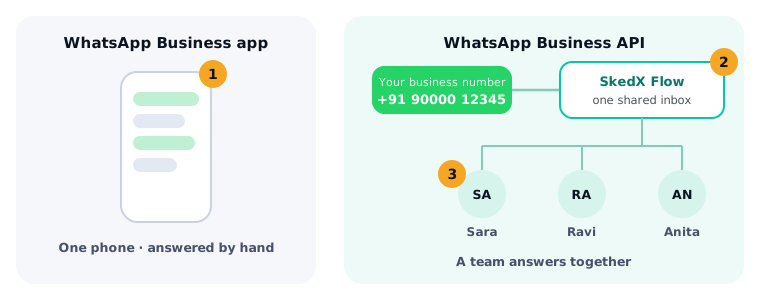
The WhatsApp Business app (1) is free and lives on one phone: you answer each chat by hand. The WhatsApp Business API connects your business number to software instead — in SkedX Flow, one shared inbox (2) that a whole team answers together (3), with each chat on the customer’s record. Meta now calls it the WhatsApp Business Platform; most businesses use its Cloud API through a provider.
2When you need the API instead of the app
Move to the API when more than one person answers, when chats must reach your records and reports, when you send templates to many customers at once, or when automations should reply for you. A shop where one person answers a few chats a day is fine on the app.
3How messages work: the 24-hour window and templates
A customer can message you at any time. For 24 hours after their last message you can reply with anything — text, pictures, files. After that, or to start a chat yourself, you send a template: a message WhatsApp approved in advance (see Get a WhatsApp template approved).
4What it costs
Meta charges for the templates you send at rates it sets per country and changes from time to time. Since 1 October 2026 it charges replies too, after the first 1,000 a month on each number; a chat that began from a click-to-WhatsApp ad is free for 72 hours. Meta lists its current rates on its pricing page.
5Get it in SkedX Flow
Go to Settings → Channels → WhatsApp and click Add Number. Flow opens WhatsApp’s own signup window: sign in to Facebook as your business’s admin, add the number and press Finish. Every step, with a video: Connect your WhatsApp number to SkedX Flow.
© 2026 SkedX · Sample data only · Share and link freely · Copying the product or its design is not allowed · Terms
Common questions
Is the WhatsApp Business API free?
Not entirely. Meta charges for templates at its own rates, and for replies after the first 1,000 a month on each number. What each message costs in SkedX Flow: Free WhatsApp replies and what each message costs.
Can I keep using the WhatsApp Business app on my phone?
Yes, with a number that is already in the app: in the signup window pick Connect a WhatsApp Business app and scan the QR from inside the app.
What is a BSP?
A Business Solution Provider — a company Meta lets connect businesses to the API. SkedX Flow connects your number through one, inside its own signup window, so there is nothing extra to set up.
Can a template go to anyone?
Only to people who agreed to hear from you on WhatsApp, and only a template WhatsApp approved. A customer who blocks or reports you lowers your number’s standing.
Next in ChannelsConnect your WhatsApp number to SkedX Flow →
Previous: Free WhatsApp replies and what each message costs · All Channels guides
Did this guide help?
Still stuck?Chat with support →


