Every role gets one picker per module, so the whole role reads in a glance — and what you set is what the server enforces.
In review: written from the product, not yet walked through live.
Part of Control what each person can see and do in SkedX Flow — its video shows the whole feature.
1Open Roles & Permissions
Go to Settings → Users & Teams and open the Roles & Permissions tab (1).

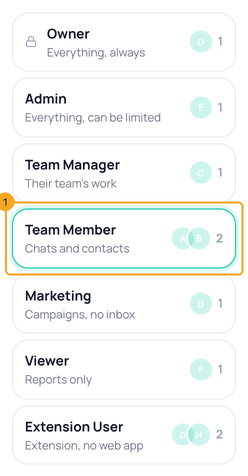
2Pick a role
Pick the role to change, like Team Member (1). Each role shows the photos of who holds it and how many.
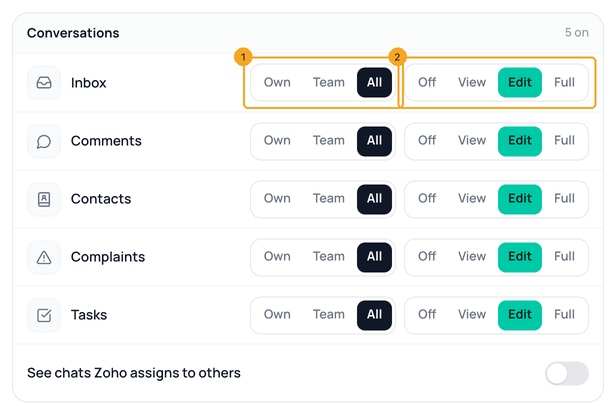
3Set each module
Each row is one module. Choose who it reaches — Own, Team or All (1) — and how far they can go: Off, View, Edit or Full (2). Each step includes the ones before it.
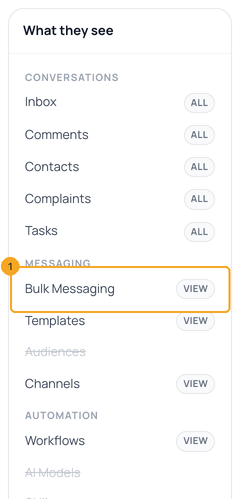
4Check What they see
What they see shows this role’s sidebar as you change it; a struck module is not in it. Bulk Messaging (1) just came back because its level moved from Off to View. Tap a module to jump to its picker.
5Save
Click Save (1). Only what changed is sent, and SkedX asks you to sign in again first. Reset puts the role back.

© 2026 SkedX · Sample data only · Share and link freely · Copying the product or its design is not allowed · Terms
Common questions
What does Full add over Edit?
The things you can’t undo or that cost money: delete, publish a workflow, submit a template to Meta, connect or disconnect a channel, export, and send or stop a campaign.
Can a Team Member still run an automation from a chat?
Yes. Running one from the reply box, answering an approval and claiming a chat are Inbox actions, so Inbox at Edit is enough.
Can I give one person less than their role?
Yes — see Hide a module for one person. It can only take away, never give more.
Why can’t I change Analytics?
Analytics is for owners and admins in every workspace.
What happens to a role I never saved here?
It keeps what it could do before; this screen shows it as levels and never more than that.
Next in Your teamChoose who can see each account — two of your three Instagram accounts for one person →
Useful links
- Users & Teams in SkedX Flow — Roles & Permissions
Previous: Control what each person can see and do in SkedX Flow · All Your team guides
Did this guide help?
Still stuck?Chat with support →


