The account decides who sees it.
In review: written from the product, not yet walked through live.
Part of Control what each person can see and do in SkedX Flow — its video shows the whole feature.
1Find the account
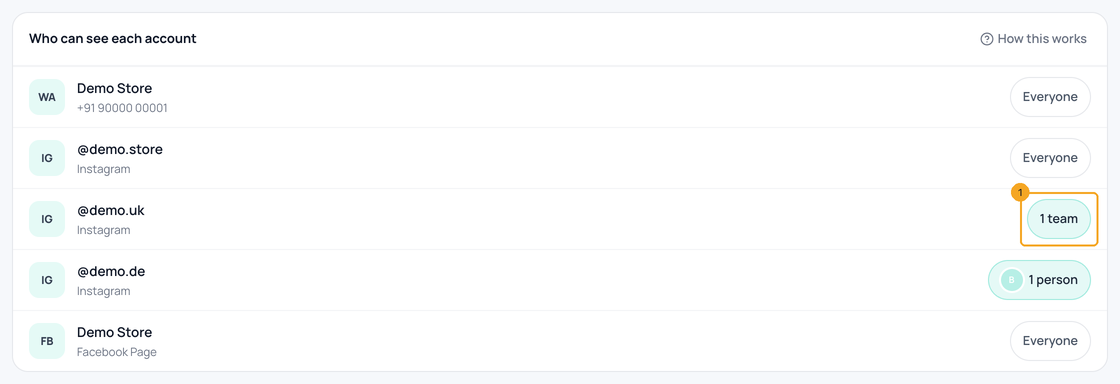
Open Channels and scroll to Who can see each account. Each account’s chip says who sees it — click the one to change (1).
2Choose teams and people
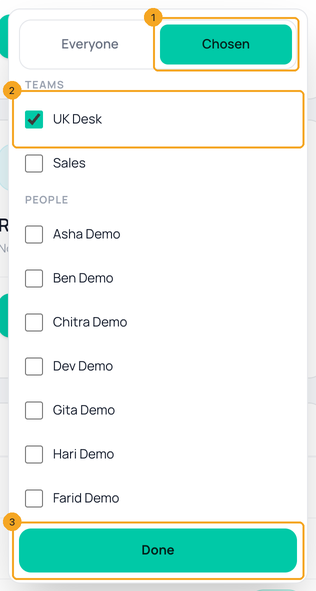
Pick Chosen (1), tick the teams or people who should see it (2), and click Done (3). Everyone else stops seeing this account’s chats.
3Or from the person
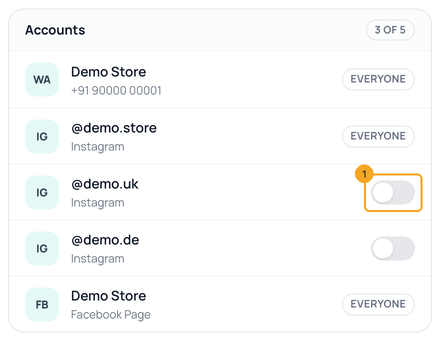
In Users, open the person and click Accounts & modules: each Chosen account has a switch (1). Accounts set to Everyone only read here.
© 2026 SkedX · Sample data only · Share and link freely · Copying the product or its design is not allowed · Terms
Common questions
Do owners and admins lose an account?
No. Owners and admins always see every account.
Does it hide old chats too?
Yes — every chat on that account, old and new, in every list, search, contact history and the extension.
Which channels does this cover?
WhatsApp numbers, Facebook Pages and Instagram accounts. SMS, Telegram, LinkedIn, email and web chat stay visible to everyone for now.
Can they still send a campaign from that number?
No. The sender list offers only the numbers they may see.
Useful links
- Channels in SkedX Flow — Who can see each account
Previous: Set what each role can do in SkedX Flow · All Your team guides
Did this guide help?
Still stuck?Chat with support →


