Share one link; the right person — or everyone, or a seat — is booked, and the meeting says why.
In review: written from the product, not yet walked through live.
1Choose the kind of link
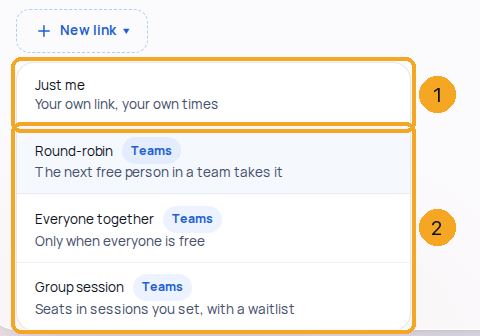
In Calendar settings, open Booking links and press New link. Just me (1) is your own link; the three team kinds (2) — Round-robin, Everyone together and Group session — come with the CRM.
2Choose who’s in, and who gets the next one
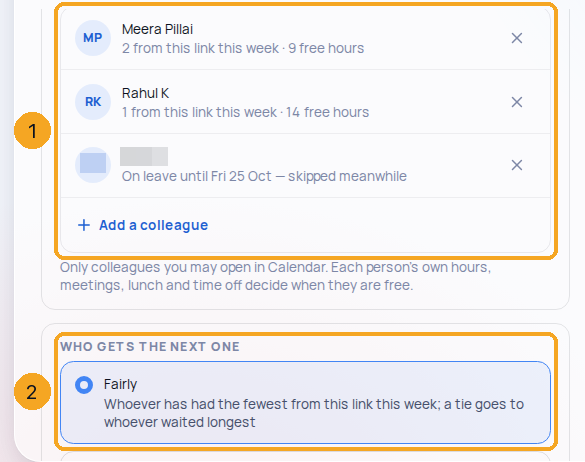
On Details, Who’s in (1) lists the people, each with how many they have had from this link this week and their free hours — or that they are on leave. For round-robin, choose Fairly or In this order (2); the order changes with ↑ ↓.
3What people see for a group session
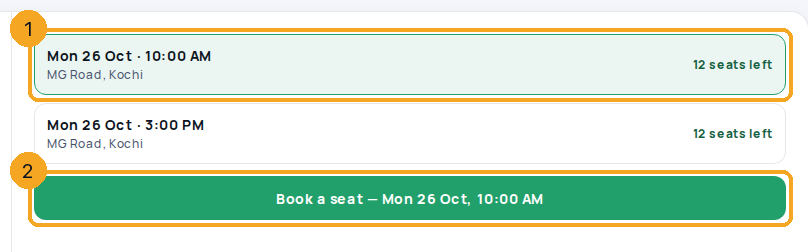
A group link shows its sessions across the page, each with where it meets and the seats left (1). People pick one and press Book a seat (2), which names the session’s day and time — or, when it is full and the waitlist is on, Join the waitlist.
© 2026 SkedX · Sample data only · Share and link freely · Copying the product or its design is not allowed · Terms
Common questions
Who does a round-robin booking go to?
The person the rule picks at the moment of booking, among those free then. Fairly picks whoever has had the fewest from this link this week; In this order picks the first free person in your list. The meeting says which, and why.
Can the person who got it pass it on?
Yes — Hand over on the meeting lists the colleagues on the link who are free then. The meeting moves to them, they get a bell, and the visitor gets an email naming who.
What happens to a cancelled seat?
With the waitlist on, it goes to the first person waiting at once: their seat is booked, the meeting lands on the hosts and they are told by email.
Why can’t I add a colleague?
Who’s in lists only colleagues your role lets you open in Calendar (Me ▾). Ask an admin, or ask them to make the link.
Do team links cost extra?
No. Calendar is part of the CRM — Just me and the team kinds come with it, no separate price.
Previous: Your company’s one address — and where it leads · All Calendar guides
Did this guide help?
Still stuck?Chat with support →


