A price on the link; the money goes straight to your own account, and the booking is made when it is paid.
In review: written from the product, not yet walked through live.
1Set a price on the link
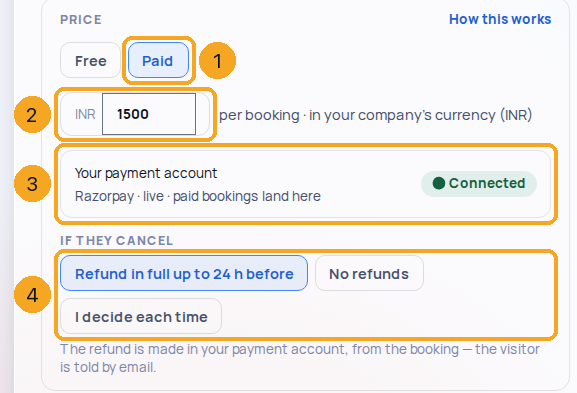
Open a link in Calendar settings › Booking links. On Details, under Price, choose Paid (1) and type the amount (2) — it is in your company’s currency. Your payment account shows below (3), and If they cancel (4) sets the refund.
2Connect your payment account, once
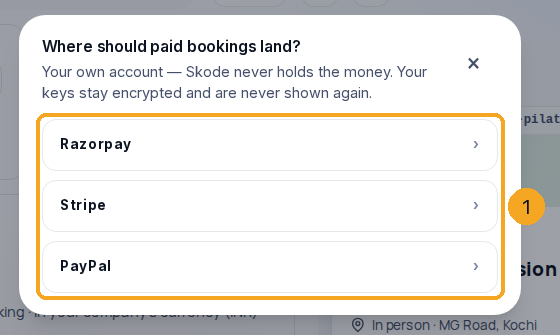
No account yet? Press Connect a payment account and choose Razorpay, Stripe or PayPal (1). Paste your keys and add the webhook address it shows in your gateway — that is how your gateway tells SkedX a booking is paid.
3What the visitor sees
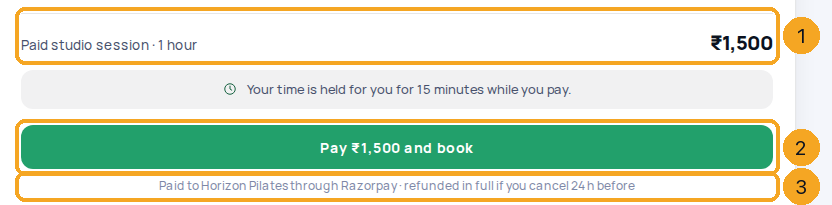
The price (1), in your company’s currency, sits above Pay … and book (2); the line under it (3) says who it is paid to and your refund rule. Their time is held for 15 minutes while they pay.
4If the payment does not go through
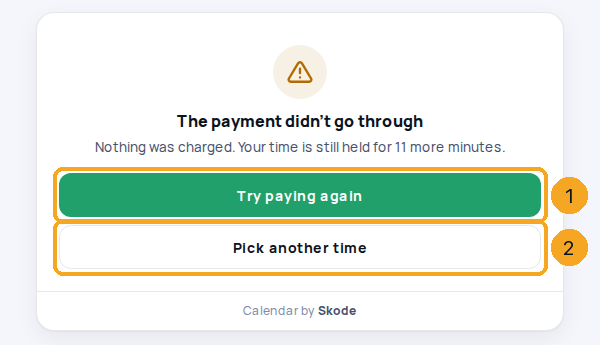
Back without paying, they are told nothing was charged and how long their time is still held, with Try paying again (1) and Pick another time (2).
© 2026 SkedX · Sample data only · Share and link freely · Copying the product or its design is not allowed · Terms
Common questions
Does SkedX hold the money?
No. The visitor pays your own Razorpay, Stripe or PayPal account directly. SkedX only hears from your gateway that it was paid, and then makes the booking.
What happens to a time while they pay?
It is held for them for 15 minutes. If they do not pay in that time it is offered again. A payment that arrives later still books the time if it is free; if someone else has taken it, the payment is refunded and they are told by email.
How do refunds work?
By the rule on the link. Refund in full up to 24 h before: Razorpay and Stripe refund automatically when they cancel in time; with PayPal you refund in PayPal. No refunds keeps the payment. I decide each time leaves it to you — the visitor is told you will be in touch.
What if someone pays twice for one booking?
Try paying again closes their first payment page, so this is rare — but if both payments go through, the booking is made once and the second payment is refunded in full by Razorpay or Stripe. You get a notification “paid twice” that says whether it is already on its way back; with PayPal it tells you to refund it in your PayPal account.
What if a payment arrives but the booking cannot be made?
For example the link was switched off or its host left while they paid. Razorpay and Stripe refund the payment automatically (with PayPal you refund it in PayPal), and they get an email “We couldn’t book that time” with Pick another time.
Where do I see that a meeting was paid?
On the meeting in Calendar: “Paid ₹1,500 · Razorpay”. The confirmation email is the visitor’s receipt, and the payment reaches Signal as revenue on the person.
Why does my paid link say it is not taking bookings?
No payment account is connected (or it was switched off). Connect one under the link’s Price and the link takes bookings again.
Next in CalendarCreate a meeting from the Calendar — with the person it is for →
Previous: One booking link for your team: round-robin, everyone together, group sessions · All Calendar guides
Did this guide help?
Still stuck?Chat with support →


